Concepts
Understanding a sprint burndown
The burndown shows, day after day, what was left to do in a sprint, against an ideal line that goes down to zero. You can read it during the sprint and after it is closed.
The burndown of a running or planned sprint opens from the backlog, with View the burndown in the sprint header. It also opens from Reports, in the project sidebar, with Burndown of the current sprint when a sprint is running, and Burndown next to each closed sprint. Any project member can view it, Viewers included.
What the curve shows
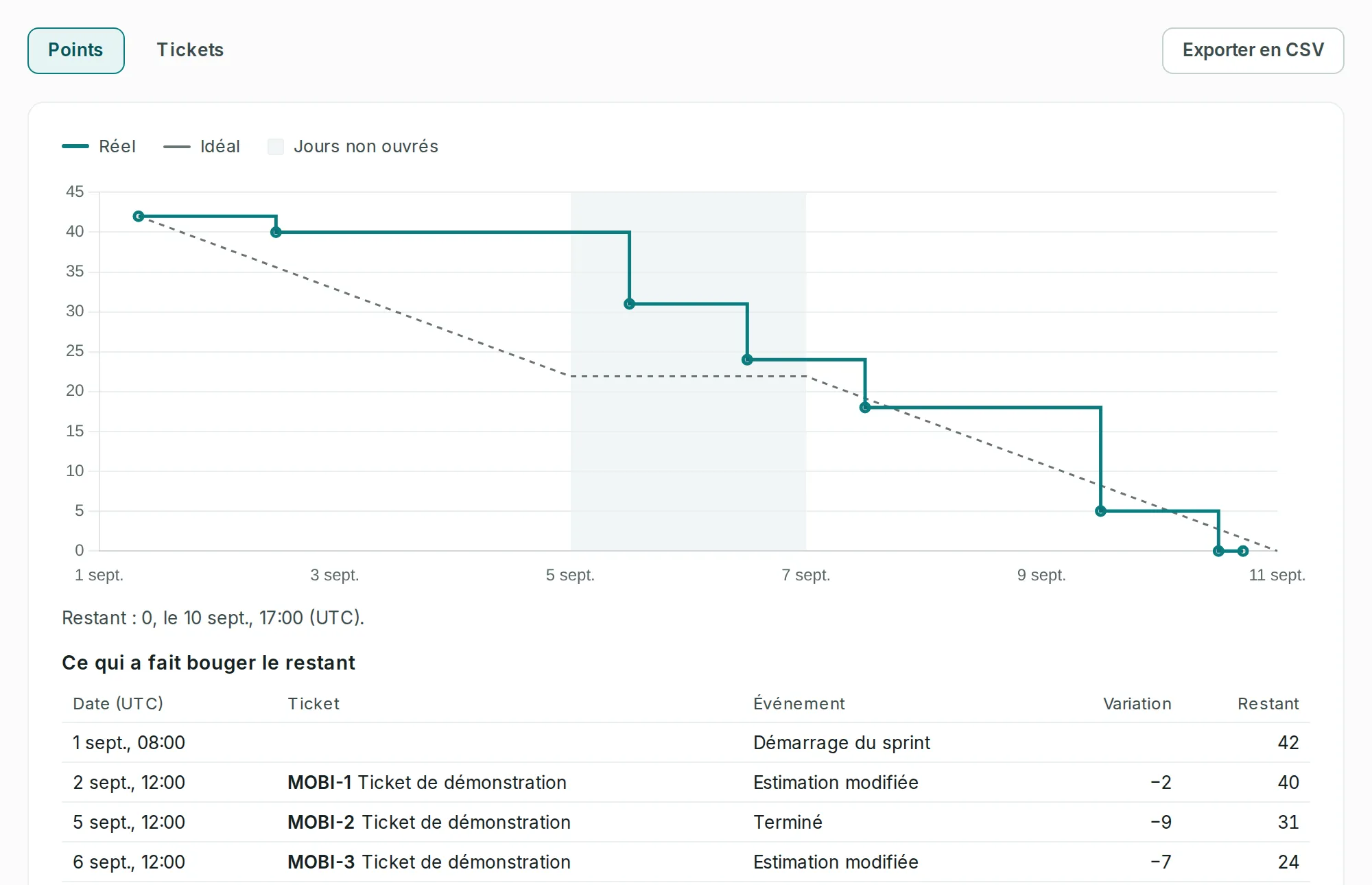
Link to the “What the curve shows” sectionThe Actual curve goes down in steps, as in Jira. It stays flat while nothing moves, then goes up or down at the very moment of a change. It counts what was left to do in the sprint: the tickets that are not in the board’s last column. A ticket is done when it enters the right-most column, and only that one.
The toggle at the top of the screen chooses the unit. In Points, the curve adds up the estimates of the remaining tickets. In Tickets, it counts these tickets. An unestimated ticket weighs zero points, but it counts as one ticket. So a team that does not estimate its tickets reads its progress in Tickets.
Under the chart, a sentence gives what is left and when, for example “Remaining: 5, on Sep 9, 12:00 PM (UTC).” The times on the screen are in UTC.
What moved the remaining work
Link to the “What moved the remaining work” sectionUnder the curve, the “What moved the remaining work” table lists each step of the curve. It starts with Sprint started, with what was left at that moment. Each following row names the ticket, what happened to it, the change and what was left after it:
- Added to the sprint and Removed from the sprint: the sprint’s scope changes;
- Done and Reopened: the ticket enters the last column, or leaves it;
- Estimate changed: the estimate of a remaining ticket changes;
- Created in the sprint: a ticket is created directly in the sprint.
A closed sprint ends with a Sprint closed row. A change that does not move the chosen unit makes neither a step nor a row: in Tickets, a changed estimate; in Points, adding an unestimated ticket.
A curve recalculated from the history
Link to the “A curve recalculated from the history” sectionThe curve and the table are recalculated each time they open, from the tickets’ history, as in Jira. The past does not improve afterwards: finishing a ticket today does not change what was left yesterday, because the history knows it was still open.
Two actions do change the past, though. A deleted ticket disappears from the curve, with its sub-tasks. And reordering the board’s columns changes the one that counts as done, past days included.
The ideal line and non-working days
Link to the “The ideal line and non-working days” sectionThe dotted Ideal line is a guide. It starts from what was left at the start and goes down to zero at the end of the sprint’s last planned day. It only goes down on working days: it stays flat on Saturdays and Sundays, which the curve greys out. The legend calls them Non-working days. Days are counted in UTC time.
During the sprint and after
Link to the “During the sprint and after” sectionWhile the sprint is in progress, the curve goes up to now, even after its planned end date. A closed sprint stops at the moment of its closing, before unfinished tickets go to the backlog or to the next sprint: so the curve shows what was left.
A sprint that has not started has no curve yet. The screen then shows “This sprint has not started yet”. The curve starts when the sprint starts.
Good to know
Link to the “Good to know” section- The burndown, sprint closing, the sprint report and velocity count a ticket done when it is in the board’s last column, and only then, as in Jira. A Done-category column placed before the last one, such as “QA”, does not count yet.
- If the curve does not load, the screen shows “The sprint’s burndown could not be loaded.” followed by the cause, with Retry.
- “This sprint does not exist, or you are not a member of the project.” means that the address leads to no sprint, or that you are not a member of its project.
- To compare sprints with each other, see Understanding velocity.