How-to
View the audit log
The audit log keeps what was done in FormulooPM, who did it and from where. The Super Admin reads it, filters it and exports it to CSV.
The audit log keeps what was done in FormulooPM, newest first, like Jira’s. It is for Super Admins only.
Open the log
Link to the “Open the log” section- In the top bar, click Settings (the gear), then Administration.
- In the administration sidebar, click Audit log.
Read an event
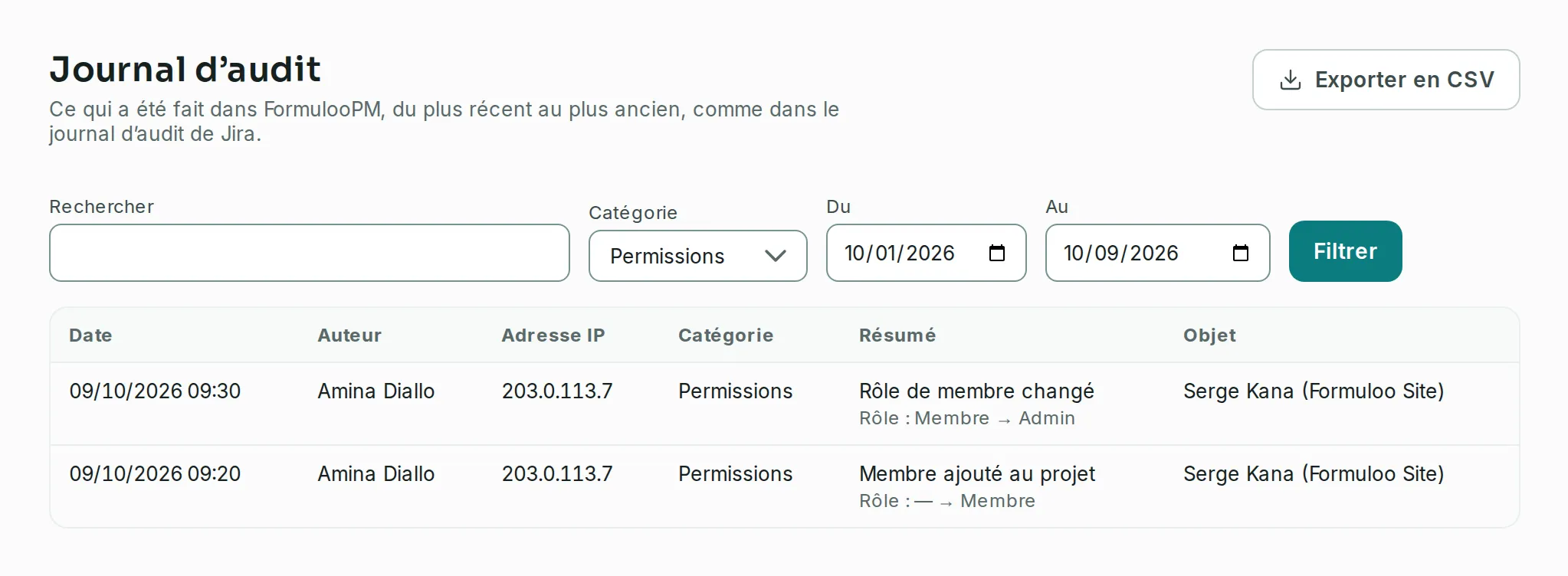
Link to the “Read an event” sectionEach row of the table is an event:
- Date: the day and time, in your time zone.
- Author: the person who did it. System marks something FormulooPM did itself.
- IP address: the address it came from.
- Category: for example Permissions.
- Summary: what was done, then the values that changed, for example “Role: Member → Admin”.
- Object: what it was done to, followed in brackets by what holds it: the project of a status or a member, the site of a project or a team, the team of a person added to it.
For now, the log receives what is done to projects and around them:
- Projects: a project created, archived or unarchived.
- Workflows: a status created, renamed, recoloured, moved or deleted.
- Permissions: a member added, a role changed, a member removed, a right granted or withdrawn, an invitation sent or cancelled. A role change also tells the rights it puts back to their default. An accepted invitation reads as a member added, signed by the invited person. Joining a project also joins its site: that is not another row, the member added says it.
- Automations: a rule switched on or off.
- Sites and teams: a site created or renamed, a person added to the site by an administrator, given another role or removed (with the teams they leave), a team created, changed or deleted, a person added to a team or removed.
Sprints, ticket deletions, imports and exports, accounts, sign-ins and the audit log settings will follow.
- Type a word in Search, for example the name of a person, of a project or an IP address. It is looked for in the author, the IP address, the object and its project, the associated items and the values. The summary shown on screen is not: searching “Member role changed” finds nothing. Roles are searched by their French code, for example “membre” or “admin”.
- Choose a category in Category, or leave All categories.
- Choose a period with From and To. Both days are included.
- Click Filter.
The table shows the 50 most recent events. Click Load more to read the next ones.
Export to CSV
Link to the “Export to CSV” section- Set the filters and click Filter. The export takes the filters applied to the table, not those only typed in.
- Click Export to CSV. The file
journal-audit-YYYY-MM-DD.csvholds ALL the events these filters keep, not only those shown. Its columns are the table’s, plus Associated items and Changed values. The date is written in ISO format, in universal time (UTC), while the screen shows it in your time zone.
The export stops at 20,000 events. The file is then named journal-audit-YYYY-MM-DD-incomplet.csv, and the screen says so. Narrow the period to get the rest.
How long the log keeps events
Link to the “How long the log keeps events” sectionThe log keeps six months of events. Older ones are removed automatically.
If you get stuck
Link to the “If you get stuck” section| What you see | What to do |
|---|---|
| Administration does not appear in Settings. | Administration is for Super Admins only. See Understanding the administration console. |
| “No event matches these filters.” | Widen the period, check that From does not come after To, or choose All categories. |
| “The audit log is unavailable for now. Try again in a moment.” | The service that keeps the log does not answer. If it happens on Load more or on the export, the table already read stays on screen. Try again with Filter. |
| “The audit log could not be read. Try again in a moment.” | Reload the page. If the message comes back, report it. |